
Executive Summary
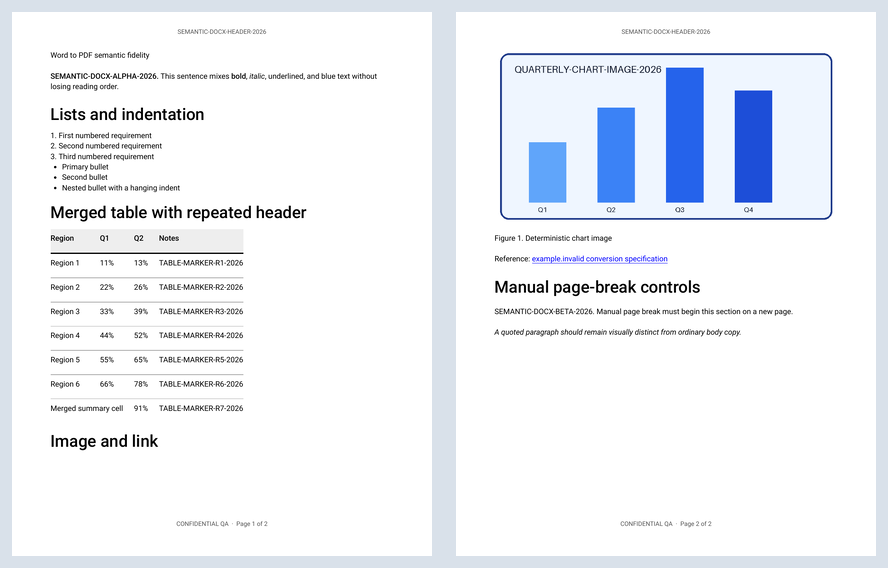
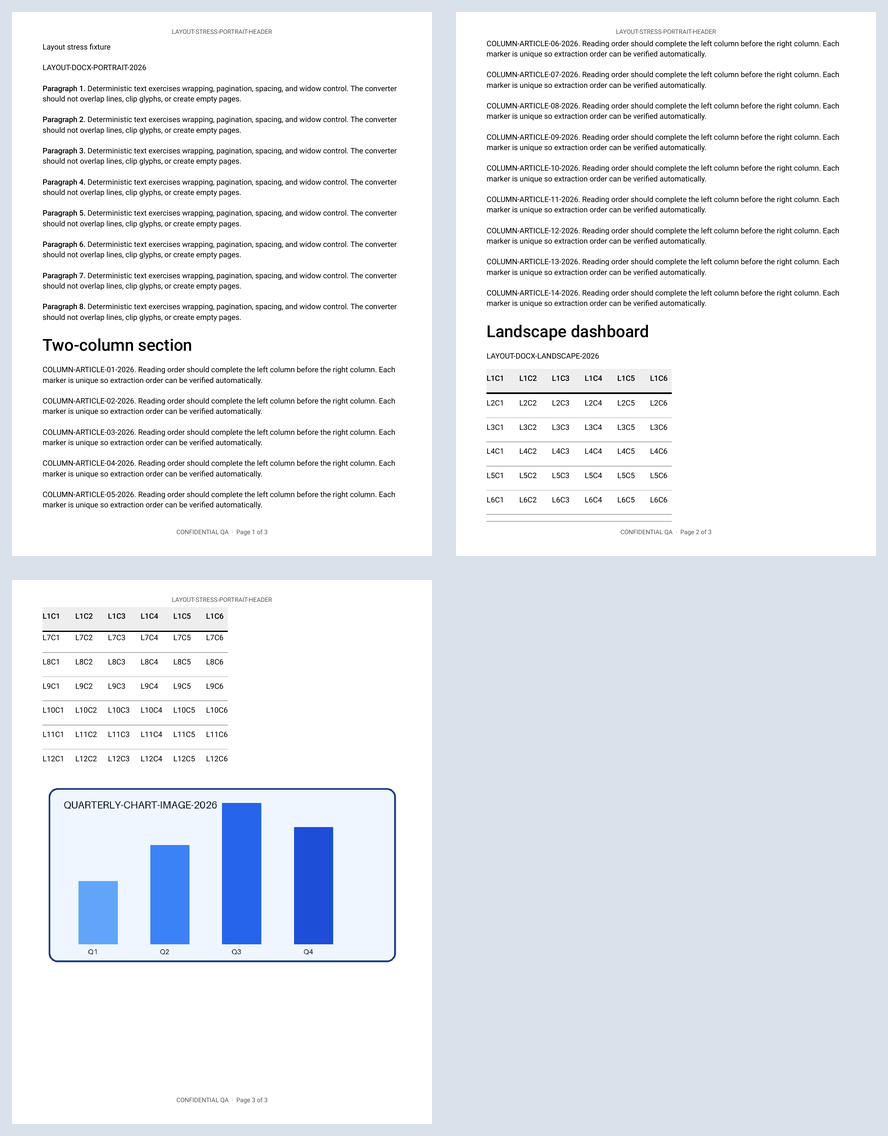
Searchable Word→PDF retained all key markers in the semantic, layout, pagination, and Unicode fixtures. It kept the semantic document's three pages and manual page break; the four-page mixed-section source became three portrait pages. PDF→Word Editable retained all five key markers, fixed-width table structure, reading order, three page boundaries, and the landscape final section. Layout-aware retained the text but expanded the three-page source to four pages.
- Best default for Word→PDF: Searchable text. It kept lists, table content, the chart, hyperlink, headers, footers, and selectable text in the semantic fixture.
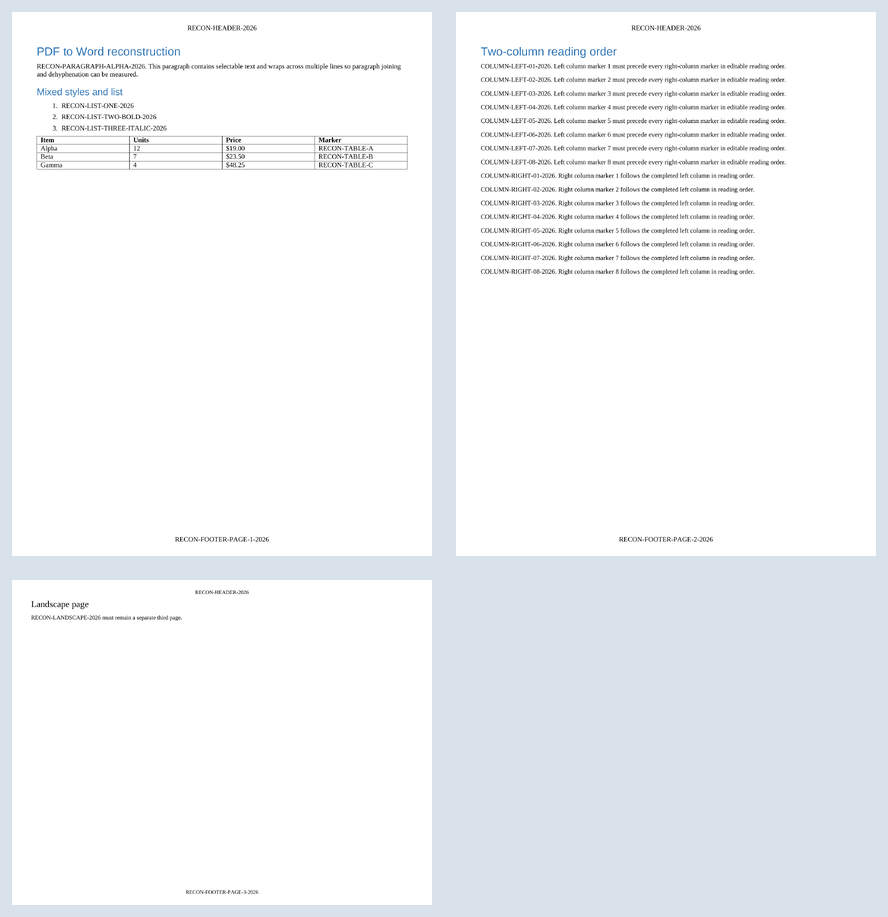
- Best default for PDF→Word: Editable document. It produced a cleaner three-page result than Layout-aware on this fixture.
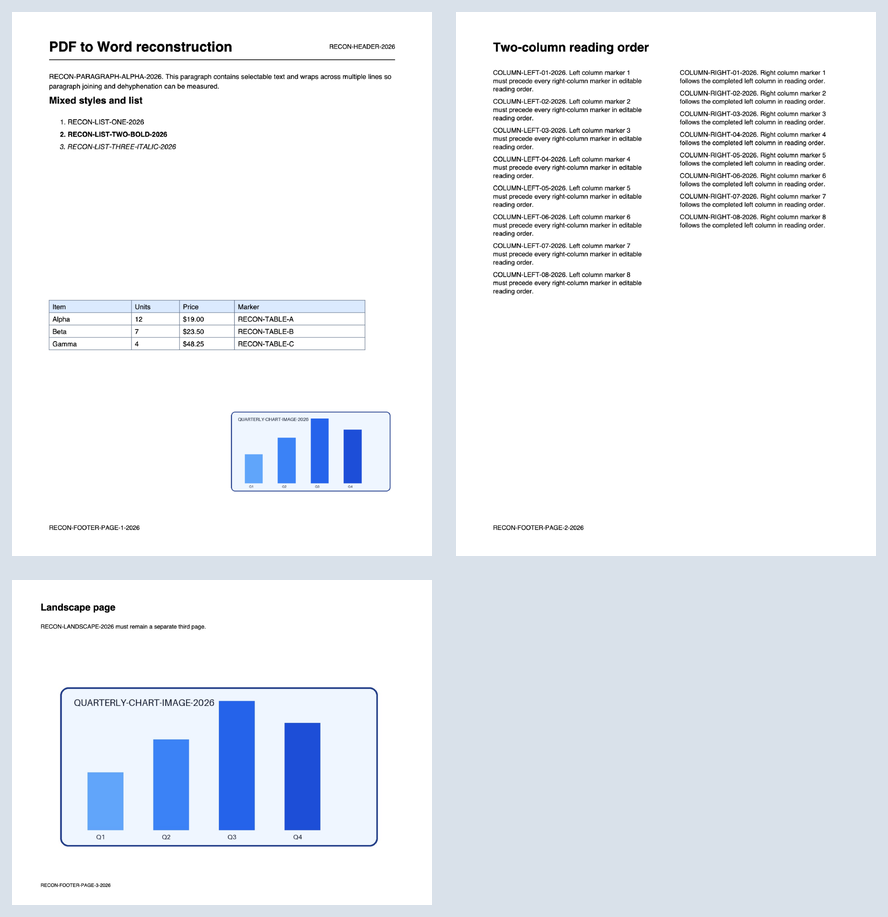
- Best appearance: Visual replica. Both visual tests retained the rendered appearance, but their text was image-based and not editable/searchable.
- Unicode result: searchable Word→PDF preserved the tested Latin, Greek, Cyrillic, Arabic, Hebrew, and symbol lines exactly. Script-specific fonts were loaded only where the document required them.
- Safer failure: Visual Word→PDF refused the unsupported multi-section stress file rather than downloading a deceptively incomplete PDF.
Mode tradeoffs in the controlled checks
How to read this chart: Content/editability combines the listed content and structure checks. Layout/visual uses the applicable layout or visual checks for that mode. The percentages apply only to the named fixtures and checks.
Source: GoPDFConverter summary results and check-level evidence, Chromium browser conversion run measured July 10, 2026.
All ten measured conversions
| Direction / fixture | Mode | Pages | Markers | Result | Output |
|---|---|---|---|---|---|
| Word→PDF · semantic | Searchable | 3 → 3 | 3/3 | Content and manual page break retained | |
| Word→PDF · mixed layout | Searchable | 4 → 3 | 4/4 | Content retained; columns/landscape reflowed | |
| Word→PDF · pagination | Searchable | 5 → 5 | 40/40 detailed markers | No clipping, overlap, or orphaned heading observed | |
| Word→PDF · Unicode | Searchable | 1 → 1 | 6/6 labels | 6/6 exact script lines | |
| Word→PDF · Unicode | Visual | 1 → 1 | 0/6 searchable | 6/6 script lines visible | |
| Word→PDF · mixed layout | Visual | 4 → — | — | Explicit refusal; no output | — |
| PDF→Word · reconstruction | Editable | 3 → 3 | 5/5 | Best editable result in this fixture | DOCX |
| PDF→Word · reconstruction | Layout-aware | 3 → 4 | 5/5 | Text retained; source page 2 expanded | DOCX |
| PDF→Word · reconstruction | Visual replica | 3 → 3 | 0/5 editable | Appearance retained as page images | DOCX |
| PDF→Word · reconstruction | Editable, boundaries off | 3 → 1 | 5/5 | Continuous-flow control behaved as selected | DOCX |
Rendered evidence
Every source and output page was rendered before scoring. These contact sheets show the tradeoff directly; full files are linked in the table above.
Download the fixtures, outputs, and schema
The fixtures are deterministic and contain no personal data. DOCX archive timestamps and document metadata are fixed, and the PDF generator uses invariant output. The manifest records SHA-256 checksums. The dataset and fixtures are licensed CC BY 4.0.
Download fixture bundle Download output bundle
Fixture manifest · Results CSV · Detailed checks CSV · JSON Schema · Dataset README
Method
- Generate controlled sources.
Four DOCX fixtures isolate semantic structure, mixed portrait/landscape sections, long pagination, and six script families. One PDF fixture isolates paragraphs, styled lists, a table, an image, two-column reading order, headers, footers, and a landscape page.
- Convert each sample in the browser.
The public Word→PDF and PDF→Word tools processed every supported mode. The visual Word→PDF mode declined the unsupported multi-section sample instead of returning a misleading file.
- Inspect outputs independently.
PyPDF checked PDF text, annotations, images, pages, and geometry. ZIP/XML inspection checked DOCX text, relationships, tables, fixed widths, media, sections, and reading order.
- Render every page.
Poppler rendered PDFs. LibreOffice rendered DOCX files to PDF, then Poppler rendered those pages. Every rendered page was visually checked for clipping, overlap, page breaks, columns, tables, images, and orientation.
- Keep unlike measurements separate.
No single opaque “fidelity score” grades unlike features as if they were interchangeable. The CSV records each check, method, evidence, denominator, and output checksum.
Verified behavior and limits
- Editable PDF→Word uses fixed-width table columns and can preserve PDF page boundaries or produce one continuous-flow document.
- Layout-aware mode can add pages because it favors line placement over compact paragraph flow.
- The tested editable conversion did not retain every source image, while Visual replica preserved page appearance by making the page image-based.
- Searchable Word→PDF preserved Latin, Greek, and Cyrillic in this fixture, but not every Arabic, Hebrew, or symbol character.
Caveats and assumptions
This is a controlled challenge, not a population estimate for all Word and PDF documents. It does not cover tracked changes, comments, equations, embedded spreadsheets, macros, floating text boxes, complex footnotes, right-to-left paragraph layout beyond short lines, accessibility tags, or password-protected inputs. LibreOffice supplied the DOCX reference renders; Microsoft Word can paginate differently.
Visual inspection checks are disclosed separately from automated checks. A pass means the named condition passed on the published fixture and output, not that every similar document will pass. Browser, font availability, memory, and third-party library versions can change results.